
Try the Four Demos
Launch chat, streaming replies, customer support, and Agent together, then choose a scenario.
1. Launch together
Install Go 1.26+, Node.js 22.12+ (or 20.19+), and npm. From the current repository root, run:
node demo/start.mjsThe launcher prepares a single-node cluster with 256 hash slots and the required business services, then opens the catalog. The first run downloads dependencies. The default mock model needs no key.
The catalog defaults to http://127.0.0.1:5174/demos/ and uses a free port if occupied. Use the printed or automatically opened address; each Demo is already configured for this cluster. Press Ctrl+C to stop all processes from this run.
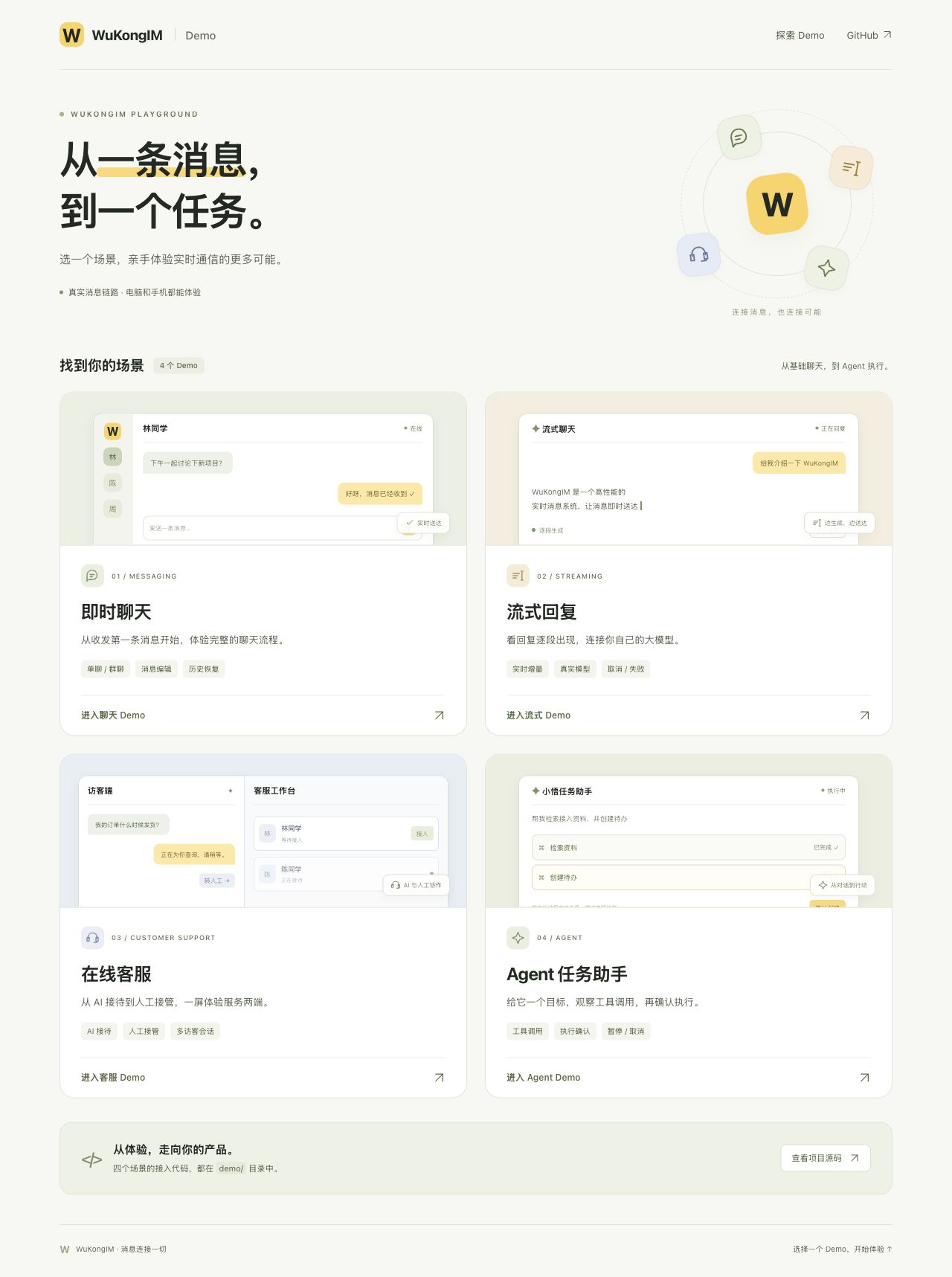
Choose a scenario; each Demo has a home link. The catalog shown uses Chinese labels. This capture comes from local main; entries in released images depend on their version.
2. Choose a scenario
| Demo | First action | Explore |
|---|---|---|
| Chat (即时聊天) | Sign in as Alice and Bob | Direct/group chat, message edits, history recovery |
| Streaming replies (流式回复) | Create demo accounts, connect, and ask a question | Incremental replies, cancellation, failure, and recovery |
| Customer support (在线客服) | Start the demo, request human support, and accept it as an operator | AI reception, human takeover, multiple visitors |
| Agent | Start the demo, submit a task, and inspect tool cards | Tool calls, todo approval, pause, and cancellation |
These four Demos come from current source. Starting a Docker container alone does not start the support or Agent Node business backends. Use the launcher above for the complete experience. Source and independent launch instructions: demo/README.md.
Local testing only
The launcher binds to loopback. Chat Demo credential creation writes the test UID's token; leave it off for existing accounts and migration acceptance. A trusted business backend must own production identities and permissions.
Existing Linux / Docker cluster: open Chat Demo
Entry points
| Environment | Chat Demo address | API base URL |
|---|---|---|
| Linux / Docker single-node cluster | http://127.0.0.1:5001/demo/ | Same origin as the page |
| Repository three-node Compose | http://127.0.0.1:15001/demo/ | Same origin as the page |
To connect to another API address, use:
http://127.0.0.1:5001/demo/?apiurl=http://host:portThe Demo first calls /route to discover a client WebSocket address, then uses the JavaScript SDK to establish a long-lived connection.
Troubleshoot connection addresses
Inspect the /route response in the browser Network panel. With default Docker port mappings and no api.external_ws_addr, ws_addr should use the API request hostname and Gateway port 5200. Linux initialization listens on 127.0.0.1:5200; SSH forwarding for both 5001 and 5200 allows the Demo to work without published-address overrides.
If the response still contains ws://0.0.0.0:5200, verify that the version includes automatic host completion and that no explicit published address contains a wildcard. On older versions, set external_ws_addr = "ws://127.0.0.1:5200" in the existing [api] section and restart; direct remote access requires a client-reachable server address and external port. WK_EXTERNAL_WSADDR overrides TOML.
If the page opens but WebSocket fails, check that Docker mappings or SSH forwarding include 5200. Remapped ports, separate domains, and HTTPS/WSS proxies need explicit published addresses and a working TLS/WebSocket ingress; see Docker Deployment.
Login fields
- API base URL: the WuKongIM HTTP API address.
- Login account: the unique user UID from the business system.
- Login token: the existing Web-device token. By default, the Demo connects without calling
/user/tokenor changing server credentials. - Create or update demo credentials: an explicit option for dedicated test accounts; it writes a Web slave-device credential through
/user/token.
Credentials stay in this tab's sessionStorage and are never placed in the URL. Reloading or
choosing Synchronize again rebuilds SDK message, conversation, and cursor state before
synchronizing with the server. Logging out removes only the Demo credential entry.
The resynchronization action refuses to discard a nonempty draft; send or save it first.
Use existing-token mode for migration acceptance. This only resets the Demo's in-memory cache; it does not clear another business app's database or certify its migration integration.
Connections with the same UID and primary-device flag may replace each other. For parallel tests, use different UIDs or independent browser sessions.
Production integration boundaries
Production boundary
Do not expose the demo authentication flow
The Chat Demo calls /user/token directly only when demo credential creation is explicitly selected. Production clients must not register or reset their own tokens. A trusted business backend should validate identities and issue credentials.
A production integration also needs to:
- Configure TLS and network-access policy for HTTP, WebSocket, and TCP traffic.
- Replace example Manager accounts, JWT secrets, join tokens, and other fixed credentials.
- Enforce account, group, friend, authorization, and content rules in the business backend.
- Choose the appropriate client SDK and handle reconnects, offline synchronization, and local message state.
After two-way messaging succeeds, continue to the next steps.